Windows 11 April Update Adds Secure Boot Certificate Status Display
Microsoft's April 2026 update for Windows 11 allows users to enable or disable SmartAppControl without reinstalling the system and quietly adds an important improvement related to boot security: Windows Security now directly displays the status of the Secure Boot certificate, allowing users to confirm whether their computer has applied the 2023 Secure Boot certificate.
Secure Boot certificates are used to verify the trustworthiness of software running during system startup. If a certificate expires, it could theoretically be exploited by boot-level malware or unauthorized modifications to inject attack code before the system is fully booted. The earliest batch of Secure Boot certificates, issued in 2011, are known to expire in June 2026, and Microsoft has previously confirmed it will replace these old certificates with new Secure Boot 2023 certificates via Windows Update. However, for ordinary users, there has been a lack of intuitive and easy-to-use ways to determine whether their computer has already been updated with the new certificate.
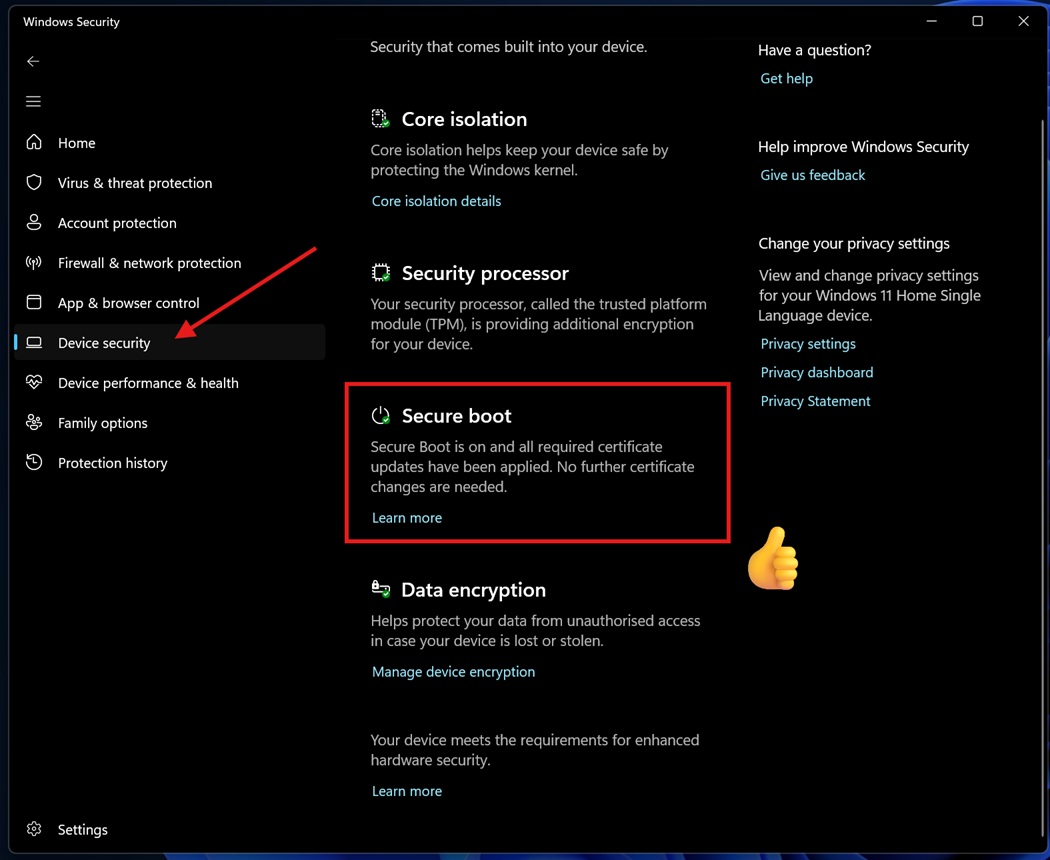
Previously, to confirm whether the Secure Boot 2023 certificate had been applied, users could only rely on more specialized methods such as PowerShell commands or event viewer logs, which is clearly not suitable for most non-technical users. With the April update, Windows Security directly displays the Secure Boot certificate status in the interface for the first time, solving this "information black box" problem. On the author's device, Windows Security already shows that the Secure Boot 2023 certificate has been applied, with a prompt stating "no further action is required."
Before the update, Windows Security only displayed information about whether the Secure Boot feature was enabled on the "Device Security" page. After the update, users can not only see whether Secure Boot is enabled, but also check whether the certificate has been updated to the latest version. This status is located in the "Secure Boot" area under "Device Security," and after completing the corresponding update, the interface provides more detailed security status feedback.
According to Microsoft, this Secure Boot status display feature is being rolled out through Windows 11 cumulative update KB5083769 and applies to systems with Build 26200.8246 / 26100.8246 or later. However, not all devices will see the feature at the same time, and the entire rollout is expected to cover all supported devices by the end of April 2026. Microsoft pointed out in a support document that the 2023 certificate is being automatically delivered via Windows Update, and the status display in Windows Security tells users whether the device has received these updates, its current status, and whether any additional action is needed.
With the new design, users can check the Secure Boot status via a simple path: open Windows Security, go to "Device Security" – "Secure Boot" to view the icons and prompts on the interface. This module adopts a three-color marking scheme similar to a traffic light: green indicates "fully updated, no action required"; yellow means "there are security recommendations," which may require contacting the computer manufacturer to update the firmware; and red indicates "immediate attention is needed," usually indicating that due to hardware or firmware limitations, Microsoft cannot apply the latest certificate to the device.
Specifically, when the Secure Boot section displays a green checkmark, the prompt will indicate "the device is protected, all required certificate updates have been completed, and no further changes are needed." When a yellow warning icon is displayed, it means the system can still run, but there are security recommendations, such as checking the prompt and updating the device firmware or related components according to the instructions. If a red icon appears, it means the system needs immediate attention in terms of Secure Boot, which often occurs on devices where the hardware conditions do not meet the certificate update requirements or Secure Boot itself is not enabled.
It is important to note that Secure Boot is a mandatory hardware requirement for officially installing and running Windows 11. For users who bypassed the hardware check through unofficial means and upgraded from Windows 10 to Windows 11, Windows Security is more likely to display a red alert, indicating that Secure Boot is not enabled and the latest certificate is missing. Microsoft advises that if this happens, users should promptly check the BIOS/UEFI settings or contact the device manufacturer.
Microsoft says that most users do not need to worry excessively about Secure Boot certificate issues, as the system will automatically deliver and apply the 2023 certificate to the vast majority of compatible devices via Windows Update. However, Windows Latest's observations show that Secure Boot certificate updates are failing on some devices due to firmware limitations, meaning these devices may not be able to obtain the new certificate for a long time, and the corresponding Windows Security status will continue to display a yellow or red warning.
Even so, not receiving the Secure Boot 2023 certificate does not necessarily mean the device will become unstable or immediately exposed to serious security risks. The report points out that for most ordinary consumers, the probability of actually being attacked solely because the Secure Boot certificate is not updated remains low, but from a long-term maintenance and compliance perspective, ensuring that the firmware is updatable, Secure Boot is enabled normally, and the latest certificate is obtained as much as possible are still key steps to improve overall security.