Windows 11 April Update Rolls Out Built-in Speed Test Feature for 24H2 and 25H2
Microsoft is pushing a built-in internet speed test feature to all eligible Windows 11 24H2 and 25H2 users via the latest April cumulative update KB5083769. The feature was initially tested before the official release of the 25H2 in September 2025, but details were limited and access was restricted to preview users. Microsoft began a gradual rollout to non-Insider users with the optional C release update KB5077241 in February 2026.
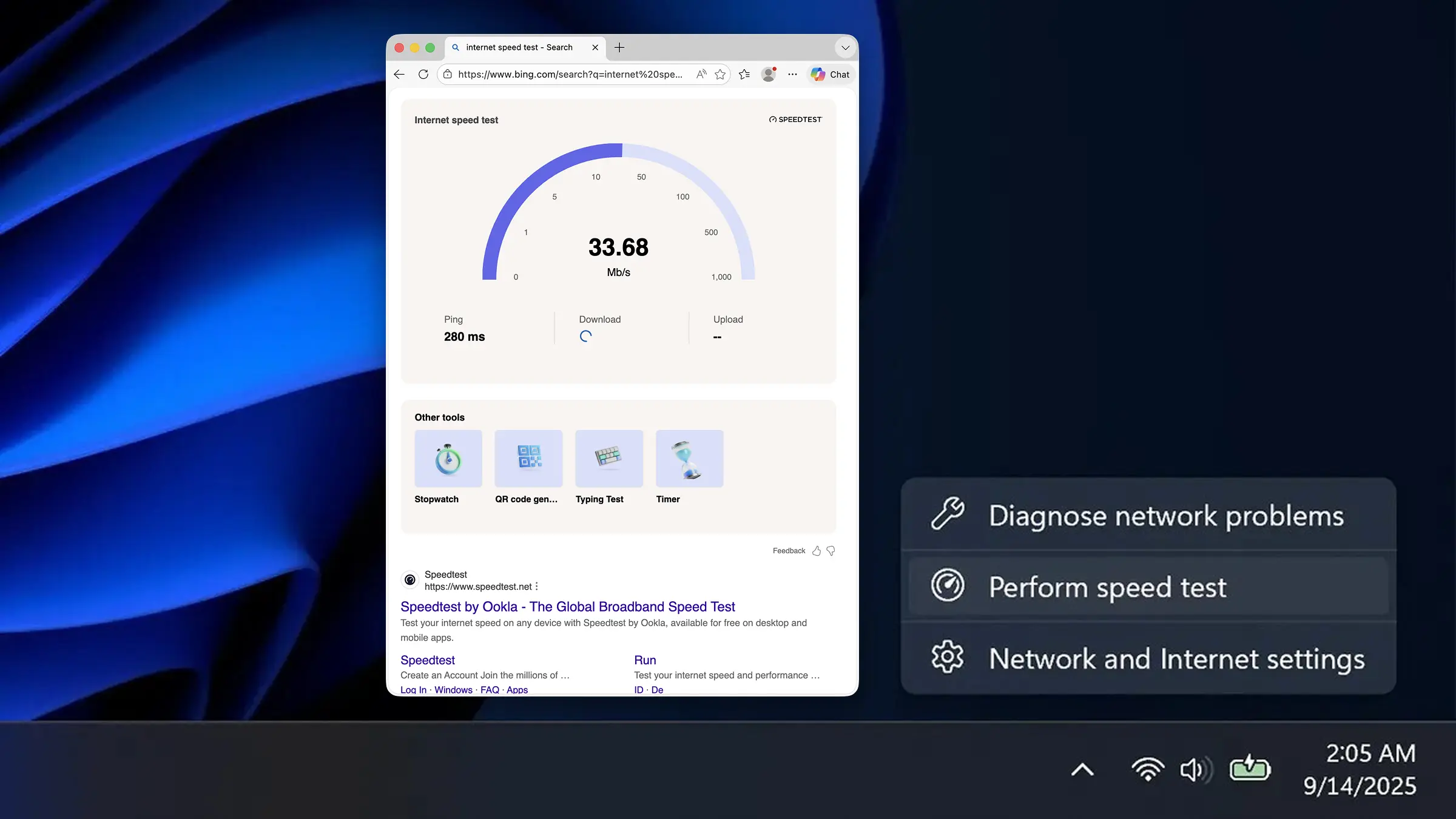
Based on the rollout schedule, this built-in speed test was originally expected to be available to more users with the “Patch Tuesday” update in March 2026, but it didn’t fully cover all devices. For users who hadn’t yet received the feature, this April patch KB5083769 is considered a “catch-up” push, with the speed test entry appearing in the system. Ookla announced this week, based on its collaboration with Microsoft, that this Speedtest capability is “now widely available to all eligible Windows devices,” further confirming the feature’s full availability. Microsoft has also updated the Media Creation Tool to support the latest Windows 11 image that includes this feature for those who wish to perform a fresh install or upgrade via ISO.
According to information released by both parties, Ookla and Microsoft have partnered to integrate the Speedtest service directly into Windows 11, allowing users to run network diagnostics directly within the system interface without relying on a browser or third-party applications. Users can find the relevant entry by right-clicking the network icon in the taskbar, or in the quick settings interface for Wi-Fi, cellular networks, etc., and can then test download speed, upload speed, latency, and network jitter. In terms of experience, this entry still opens a web-based speed test instance on Bing when called, essentially invoking the web version of Speedtest. However, compared to previously having to manually open a browser and enter keywords such as “speed test,” system-level integration reduces the number of steps, making network diagnostics more direct and convenient.
Technically, the speed test feature in Windows 11 relies on Ookla’s global infrastructure and is based on its Speedtest Web SDK, launched in 2020. This SDK allows service providers and enterprises to embed Speedtest capabilities into websites or other services, and Microsoft’s integration falls into this application scenario. The Speedtest Web SDK is built with JavaScript, providing customizable interfaces and interactions, allowing Microsoft to adapt the interface and process to the usage habits of Windows users. Through this underlying solution, the actual experience for users when calling the speed test in Windows 11 is close to visiting the official Speedtest website, but the entry point is closer to the system itself, which is beneficial for quick use in scenarios such as network troubleshooting.
Overall, with the KB5083769 update widely rolled out to Windows 11 24H2 and 25H2 users, the built-in internet speed test feature has transitioned from an early limited testing phase to a fully available state. For users accustomed to using the taskbar or quick settings panel for network management, this integration bridges the system-level network diagnostic tools with the traditional web-based Speedtest, lowering the testing threshold. Against the backdrop of Microsoft continuously enhancing system tools and diagnostic capabilities for Windows 11, this collaboration with Ookla also provides users with a more direct official speed test entry, which helps in basic performance verification and preliminary troubleshooting in home broadband, mobile hotspot, and enterprise network environments.