Microsoft Introduces Modern Interface Design for the Classic "Run" Dialog in Windows 11
Microsoft is bringing a long-awaited comprehensive upgrade to the historic "Run" dialog in Windows 11, aligning this classic component with contemporary system experiences in terms of both appearance and performance. This adjustment has been rolled out to testers with the latest Windows 11 preview build, focusing on modern design, faster responsiveness, and new features that better suit practical use cases.
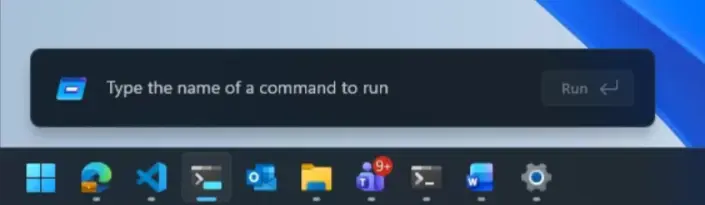
The "Run" dialog dates back to the Windows 95 era, debuting alongside the Win+R shortcut, and is one of the oldest components of the Windows interface. Over the decades, it has seen almost no significant updates to its appearance or functionality. Microsoft now believes that, with the comprehensive modernization of Windows 11's overall visuals and experience, the "Run" dialog also needs an update to keep pace with the times.
In the latest released Windows 11 preview version, Microsoft officially unveiled the new "Run" dialog, summarizing this change as three key upgrade directions: modern design, improved performance, and new features. In terms of design, the new interface is consistent with the overall aesthetic style of Windows 11, introducing a simpler layout and full support for dark mode, making it more unified and natural in appearance when used at night or under dark themes.
In terms of performance, Microsoft specifically emphasized the responsiveness of the "Run" dialog. According to Microsoft's internal data, before the modification, the median display time for the "Run" dialog was approximately 103 milliseconds. After reimplementation and optimization, the median display time for the new "Run" has been compressed to about 94 milliseconds. Microsoft also stated that this number still has room to decrease with subsequent iterations. For heavy users who rely heavily on muscle memory and want the interface to open "instantly," this level of optimization translates directly into a smoother operational experience.
Among the functional changes, a very specific improvement is easier access to the user directory. The new "Run" dialog supports quickly opening the current user directory by typing “~\”, reducing the need to manually enter the path or rely on File Explorer navigation. These seemingly minor but frequent changes reflect Microsoft's adjustment of the "Run" positioning based on actual usage behavior.
Microsoft also shared some details of the internal design process in the release notes. The team fully considered the special status of "Run" as a tool commonly used by advanced users and developers when evaluating changes, pointing out that this component is tied to strong operational habits and muscle memory, and users often expect a minimalist interface and instant response. Therefore, the development team deliberately controlled the scope of visual changes during the reconstruction, striving to maintain the original layout and interaction logic without being overly "alienated" while ensuring a more modern overall look and feel.
To determine where it could "make changes," Microsoft analyzed real usage data. The results showed that the "Browse" button was rarely used: among a sample of 35 million users, only 0.0038% used the button. Based on this, the new "Run" dialog removed this button to reduce interface elements, focus on the main input area, and leave room for performance optimization.
Interestingly, Microsoft also found that a fairly common but not intuitive use was to use "Run" as a "temporary format cleaner." Many users would first paste content into the "Run" box and then copy it out to remove rich text formatting, retaining only plain text. This discovery also reflects the "toolbox" attribute of the "Run" dialog in the workflows of advanced users, rather than simply being a command launch entry point.
During the design exploration phase, Microsoft tried multiple early prototypes and balanced appearance and performance. The final presented version maintains a sufficiently simple structure and, through underlying rewriting and optimization, compresses the time required to open the window to the aforementioned 94-millisecond median level. Microsoft stated that the team will continue to collect user feedback in subsequent preview versions to further refine performance and interaction details.
Currently, this new "Run" dialog is being gradually pushed to testers in the Windows Preview Experience Program, with the first batch going to users in the Experimental Channel. Users interested in learning about the technical implementation and design ideas can also refer to the detailed explanation about the "new Run dialog" on the official Microsoft blog. Overall, this update continues Windows 11's approach of "revitalizing" old system components, injecting speed and aesthetics that are more in line with contemporary desktop experiences into classic tools while maintaining core functionality and habits.