What are the Differences Between PCI-E Slots on a Motherboard? Understand it in One Article
The motherboard is the carrying platform for the computer host and a basic device that affects the performance of the entire system. Especially in terms of functional expansion, different cards need to be installed, such as graphics cards, professional sound cards, high-performance network cards, RAID disk array cards, etc., all of which are expanded through PCI-E slots. These slots on the motherboard are of different lengths, and many people only recognize the longest graphics card slot when assembling a computer. So what are the differences between them?
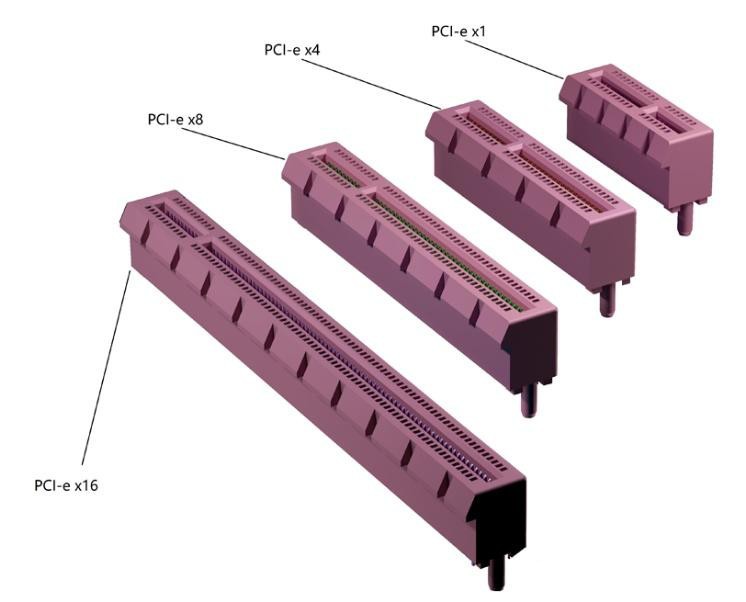
PCI-E is currently the universal high-speed expansion bus for motherboards, and is divided into specifications such as x1, x2, x4, x8, x16, and x32. The corresponding slot lengths are also different. As shown in the figure below, the PCI-E slot is divided into two sections by a standoff, and the part close to the chassis backplate provides basic power supply, reset, clock, device detection, SMBus and other functions. According to the PCI-SIG specification, they all provide up to 75W of power supply capacity physically, therefore, the length of this part of all PCI-E specification slots is the same, with 22 contact pins internally.
The length of the other section varies depending on the number of lanes. Generally speaking, the longer the physical length of the slot, the more contact pins it has internally, the more transmission lanes it provides, and the higher the overall bandwidth. In specifications, they are usually increased by a factor of 2. The following figure shows several common PCI-E slot specifications.
The shortest is the PCI-E x1 slot with a total length of 25mm, with only 14 data transmission pins internally (excluding the 22 power supply pins), which can only provide 1 transmission lane and limited transmission bandwidth. It is commonly used for low-speed peripherals, including independent sound cards, network cards, wireless network cards/Bluetooth, etc.
The medium-length PCI-E x4 slot has a total length of 39mm, with 42 data transmission pins internally, which can provide 4 transmission lanes, and can meet the stable operation requirements of medium- and high-speed hardware, such as NVMe protocol solid-state drives, and can also adapt to 10 Gigabit network cards and disk array cards. The PCI-E x4 slot also has a special form of slot, which is the M.2 slot, specifically for installing high-speed NVMe solid-state drives.
Some people may ask where the PCI-E x2 slot went? In fact, motherboard manufacturers basically do not make dedicated PCI-E x2 physical slots, and some expansion peripheral manufacturers usually reduce the PCI-E x4 specification, such as some rare OEM solid-state drives (such as the solid-state drive of the XBOX Series X/S game console) and microSD Express storage cards are x2 specifications.
Next is the PCI-E x8 slot, which is 56mm long and has 76 data transmission pins internally, which can provide 8 transmission lanes. The transmission bandwidth is four times higher than that of PCI-E x4, but it can only be seen on server motherboards or early consumer motherboards. The PCI-E x8 slot on modern consumer motherboards is often reduced from the PCI-E x16 slot, which we will talk about later.
Then there is the PCI-E x16 slot, which is the familiar graphics card slot, with a length of 89mm and 142 data transmission pins internally, which can provide 16 transmission lanes, which is the so-called "full-blooded" slot, usually used to install independent graphics cards.
In addition, the PCI-E x8 slot on consumer motherboards mentioned earlier is reduced from the PCI-E x16 slot, and its appearance is not much different from the PCI-E x16, but careful observation will reveal that it has only half the number of data transmission contact pins.
In addition, there are PCI-E x32 slots with more lanes in the PCI-E specification, and the slot length is naturally longer, so it can only be seen in servers.
Finally, let’s talk about compatibility. PCI-E is backward compatible. For example, a PCI-E x1 device can be plugged into any specification of PCI-E slot. In other words, as long as it can be plugged in, it can be used.
Overall, different PCI-E slots each have their own functions. Short slots expand small components, medium slots increase capacity and improve efficiency, and long slots are dedicated to core hardware. Reasonable planning and installation can stably exert all hardware performance, and novice assemblers can easily avoid various slot misunderstandings.