New Windows 11 Run Dialog is Faster Than the Windows 95 Version
Microsoft has rewritten the classic "Run" dialog in the new Windows 11, claiming that this modernized version launches faster than the old version dating back to Windows 95, but it has unexpectedly faced widespread ridicule and misunderstanding online.
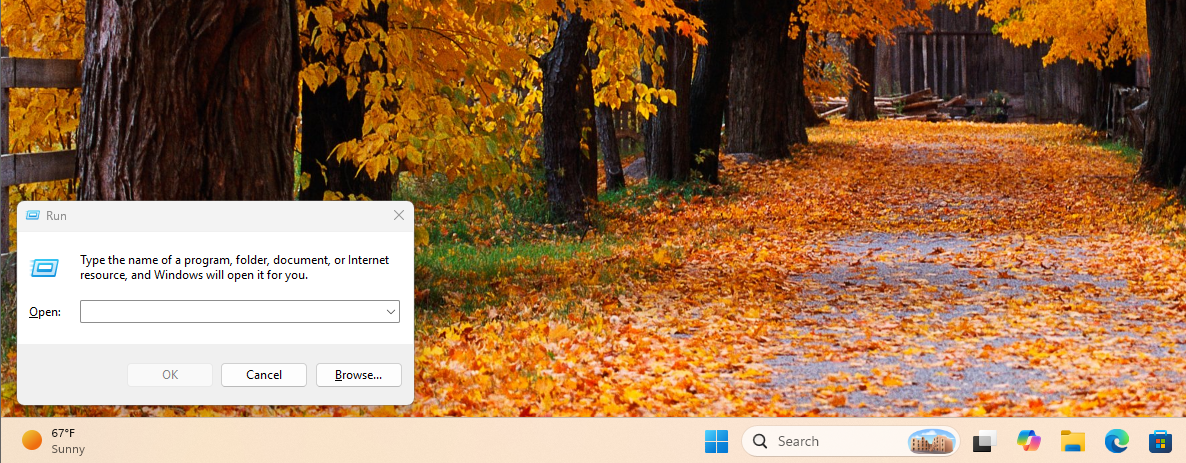
For years, Win+R has been a muscle memory shortcut for advanced Windows users, with many directly typing "winword" after startup to launch Word. However, the appearance of this small window has remained stuck in the aesthetics of the last century, clashing with the current Fluent Design language. Recently, the hidden modern "Run" dialog in Windows 11 has been undergoing interface slimming adjustments, and Microsoft has officially disclosed the engineering details behind it in a developer blog.
According to Microsoft, the new "Run" dialog is rebuilt with C# and WinUI 3, and the redesigned median "time-to-show" is only 94 milliseconds, 9 milliseconds faster than the old version. From an engineering perspective, this result is considered a significant performance optimization, but after Microsoft made this number public, it was mocked by some developers, tech reviewers, and gamers on the social platform X. Many believe that 94 milliseconds is simply "unacceptably long" in the computer world. They compared this number to game performance, pointing out that high refresh rate monitors can complete a refresh in 8 milliseconds, and 3A games can render complex 3D scenes multiple times in 94 milliseconds, questioning why Microsoft "takes so long to draw a text box."
The article points out that this sentiment stems from a fundamental misunderstanding of computer performance metrics. The rendering speeds mentioned in games primarily correspond to "frames per second" (FPS) and "hot path" scenarios: the game engine is already fully resident in memory and video memory, the asset pipeline and graphics API (such as DirectX 12) have long been initialized, and the rendering loop continues to run, so the marginal cost of outputting the next frame is extremely low. However, when a user presses Win+R to bring up the "Run" dialog, the system actually experiences a "cold path": the operating system needs to intercept keyboard interrupts, allocate memory for a new process, load the WinUI 3 and XAML frameworks, parse the layout, instantiate the text box and buttons, and read user history information.
After these initialization steps are completed, the Desktop Window Manager (DWM) also needs to overlay the new window onto the current desktop, apply Windows 11's Fluent Design effects, including Mica material transparency and shadow processing, and finally the GPU will draw the first frame to the display. Compressing this entire cold start process within 94 milliseconds is a significant engineering achievement in itself, and this relies on Microsoft's use of .NET AOT (Ahead-of-Time) technology for the new "Run" dialog, allowing C# code to execute at near-native speeds while retaining the security and development efficiency advantages of modern languages.
More importantly, many critics have overlooked the most important data Microsoft presented: the old "Run" was actually slower. Before completely rewriting this tool, Microsoft first added telemetry statistics to the traditional Win32 "Run" dialog in a sample covering 35 million users. The results showed that this seemingly "minimalist" classic window had a median "time-to-show" of 103 milliseconds. In other words, the internet is expressing dissatisfaction with an application that replaces 103 milliseconds with 94 milliseconds and has more features, while no one has ever complained about any noticeable lag in the old "Run."
In addition to performance improvements, the new "Run" has also received significant functional upgrades, with its design based on community feedback on PowerToys Run. Through telemetry, Microsoft found that only about 0.0038% of users click the "Browse" button in the old version, so the new design simplified the interface and focused on keyboard-first input experience. Users can now enter "~\” directly in the "Run" box to jump to their user home directory and continue path navigation in the text box like a command line. At the same time, this modernized version also fully supports dark mode and offers a more unified visual experience compared to the similarly outdated and still-updating file explorer properties dialog.
Currently, this new "Run" dialog is still in the Windows 11 preview stage and is being gradually rolled out to Insider Experimental Channel users as an optional feature. Users who have installed the latest preview version can enable the new "Run" experience by opening the switch in "Settings > System > Advanced."
The article concludes that Microsoft's modernization of the "Run" dialog is essentially replacing the long-standing and inconsistent old code with a cleaner architecture and AOT-compiled WinUI 3 application. This transition not only brings better theme adaptation and usability but also continues the overall improvement direction of Windows 11 in terms of interface consistency and performance. The debate about 94 milliseconds versus 103 milliseconds continues on social media, but from a technical standpoint, the new "Run" is both faster and more modern.